Posts

A To Z of Excel Functions | New Functions Introduced In 2007

Image
  New Functions in 2007 Excel 2007 Introduced 12 New Worksheet Functions. Read up other functions here. AVERAGEIF Returns the average of all the numbers in a range of cells that satisfy a condition. AVERAGEIFS Returns the average of all the numbers in a range of cells that satisfy multiple conditions. COUNTIFS Returns the number of cells with a value that satisfy multiple conditions. CUBEKPIMEMBER Returns a key performance indicator (KPI) property and displays the KPI name. CUBEMEMBER Returns a member or tuple from the cube. CUBEMEMBERPROPERTY Returns the value of a member property from the cube. CUBERANKEDMEMBER Returns the nth or ranked member in a set. CUBESET Returns the calculated members returned from a cube. CUBESETCOUNT Returns the number of items in a set. CUBEVALUE Returns an aggregated value from the cube. IFERROR Returns a value or if that value generates an error it returns a different value. SUMIFS Returns the total of all the numbers in a range of cells that satisfy ...
A To Z of Excel Functions | Series 5

Image
  A To Z of Excel Functions - Series 5 121. SUMPRODUCT FUNCTION What Does It Do ? This function uses at least two columns of values. The values in the first column are multipled with the corresponding value in the second column. The total of all the values is the result of the calculation. Syntax =SUMPRODUCT(Range1, Range, Range3 through to Range30) Formatting No special formatting is needed. 122. SYD FUNCTION What Does It Do ? This function calculates the depreciation of an item throughout its life, using the sum of the years digits. The depreciation is greatest in the earlier part of the  items life. Syntax   =SYD(OriginalCost,SalvageValue,Life,PeriodToCalculate) Formatting No special formatting is needed. CLICK TO LEARN MORE & DOWNLOAD! 123. T FUNCTION What Does It Do? This function examines an entry to determine whether it is text or not. If the value is text, then the text is the result of the function. If the value is not text, the result is a blank. The f...

A To Z of Excel Functions | Series 4

Image
  A To Z of Excel Functions - Series 4 91. NOT FUNCTION What Does It Do ? This function performs a test to see if the test fails. (A type of reverse logic). If the test fails, the result is TRUE. If the test is met, then the result is FALSE. Syntax =NOT(TestToPerform) The TestToPerform can be reference to cells or another calculation. Formatting No special formatting is needed. Example The following table was used by a library to track books borrowed. The date the book was Taken out is entered. The period of the Loan is entered. The date the book was returned is entered. The =NOT() function has been used to calculate whether the book was returned within the correct time, by adding the Loan value to the Taken date. If the book was not returned on time the result Overdue is shown, otherwise OK is shown. 92. NOW FUNCTION What Does It Do ? This function shows the current date and time. The result will be updated each time the worksheet is opened and every time an entry is made an...

A To Z of Excel Functions | Series 3

Image
  A To Z of Excel Functions - Series 3 61. ISERROR FUNCTION What Does It Do ? This function tests a cell or calculation to determine whether an error has been generated. It will show TRUE for any type of error and FALSE if no error is found. Syntax =ISERROR(CellToTest) The CellToTest can be a cell reference or a formula. Formatting No special formatting is needed. 62. ISEVEN FUNCTION What Does It Do ? This function tests a number to determine whether it is even. An even number is shown as TRUE an odd number is shown as FALSE. Note that decimal fractions are ignored. Note that dates can be even or odd. Note that text entries result in the #VALUE! error. Syntax  =ISEVEN(CellToTest) Formatting No special formatting is needed. CLICK TO LEARN MORE & DOWNLOAD! 63. ISLOGICAL FUNCTION What Does It Do? This function tests a cell to determine whether the cell contents are logical. The logical values can only be TRUE or FALSE. If the cell does contain a logical value, the res...

A To Z of Excel Functions | Series 2

Image
  A To Z of Excel Functions - Series 2 31. DEC2HEX FUNCTION What Does It Do ? This function converts a decimal number to its hexadecimal equivalent. It can only cope with decimals ranging from -549,755,813,888 to 549,755,813,887. The result can be padded with leading 0 zeros, although this is ignored for negatives. Syntax =DEC2HEX(DecimalNumber,PlacesToPad) The PlacesToPad is optional. Formatting No special formatting is needed. 32. DELTA FUNCTION What Does It Do ? This function compares two values and tests whether they are exactly the same. If the numbers are the same the result will be 1, otherwise the result is 0. It only works with numbers, text values produce a result of #VALUE. The formatting of the number is not significant, so numbers which appear rounded due to the removal of decimal places will still match correctly with non rounded values. Syntax =DELTA(FirstNumber,SecondNumber) Formatting No special formatting is needed. Example The following table is u...

A To Z of Excel Functions | Series 1

Image
  INTRODUCTION Excel is a spreadsheet program that helps calculate and organize data. It has many functions that allow you to do more than just calculations with your data. There are so many different functions in Excel that it is impossible to cover all of them in one article. But we will cover all in 5 different sections. We will show their functionalities, as well as how to use them for a range of purposes from data calculations to data visualizations. What is a Function? How to Find and Insert Functions on a Spreadsheet A function is a set of instructions for the spreadsheet that allows you to perform calculations on data. Functions can be inserted into a spreadsheet by typing them in, or selecting from a list. A function is typically made up of three components: a name, an argument, and an instruction. The name identifies what type of calculation the function will perform. Arguments are values that correspond to the data you want to use within the function. Instructions tell t...

QUIZ WHIZ APP

Image
SimpleSchool QUIZ WHIZ- An editable and interactive quiz platform for both individual and group assessment with 1000+ Questions Bank and Timer. Good for mental drills, reviews, set induction, evaluation of concepts, group quiz competition and more… It can be used on PC and on Interactive White Board. It Contains 3 sections: 1. Instruction Page The Instruction/Home page is what you see when you load the application. It contains information and instruction on how to use the App. 2. Questions Bank This is a database where questions are stored. You can store up to 1000 questions under 10 categories (100 questions per category). You can make each category store questions on different subjects. To Upload or Type Questions in the Questions Bank Double-Click and type in the Category/Subject. Double-Click and type the questions in the questions box one after the other under your chosen ...

Number Bond App 2- With 10 Timed Questions

Image
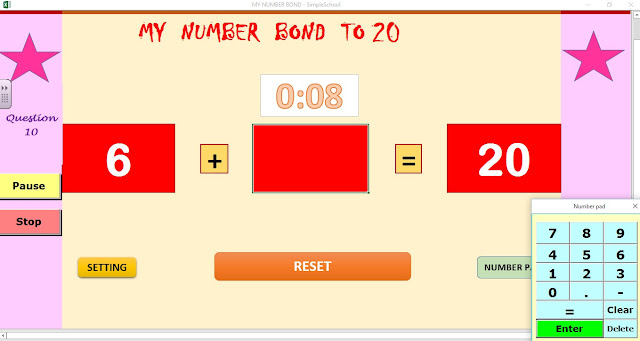
INTRODUCTION This is an updated version of 'My Number Bond App.' This version includes the 10 timed self graded questions with instant result. All the functionalities of the previous version remains. To get details of the other component Go to My Number Bond App 1 My Number Bond App 2 In order to make the teaching and learning of this important fundamental Mathematical concept easy to understand, Prime Academy Resource made this Microsoft Excel App called "My Number Bond." NUMBER BOND 1 VIDEO NUMBER BOND 2 VIDEO GET MY NUMBER BOND APP How Does My Number Bond App Works? When you load the Workbook you have this interface: You are required to update the setting form to suit your needs. The Setting Form Here you set the following: DECIMAL PLACE:  The decimal place tab has 3 options None 1 Decimal Place and 2 Decimal Place You click the drop  down arrow to select your preference. MATH OP...